Raspberry Pi Zero 2 W Webcam

I bought a Raspberry Pi model B revision 2.0 nine years ago and I’ve been using it with various cameras as a webcam server pointed out my window in places that I’ve lived. (The window where I have the camera now gets direct sun on sunny days, causing a lot of lens flare.)
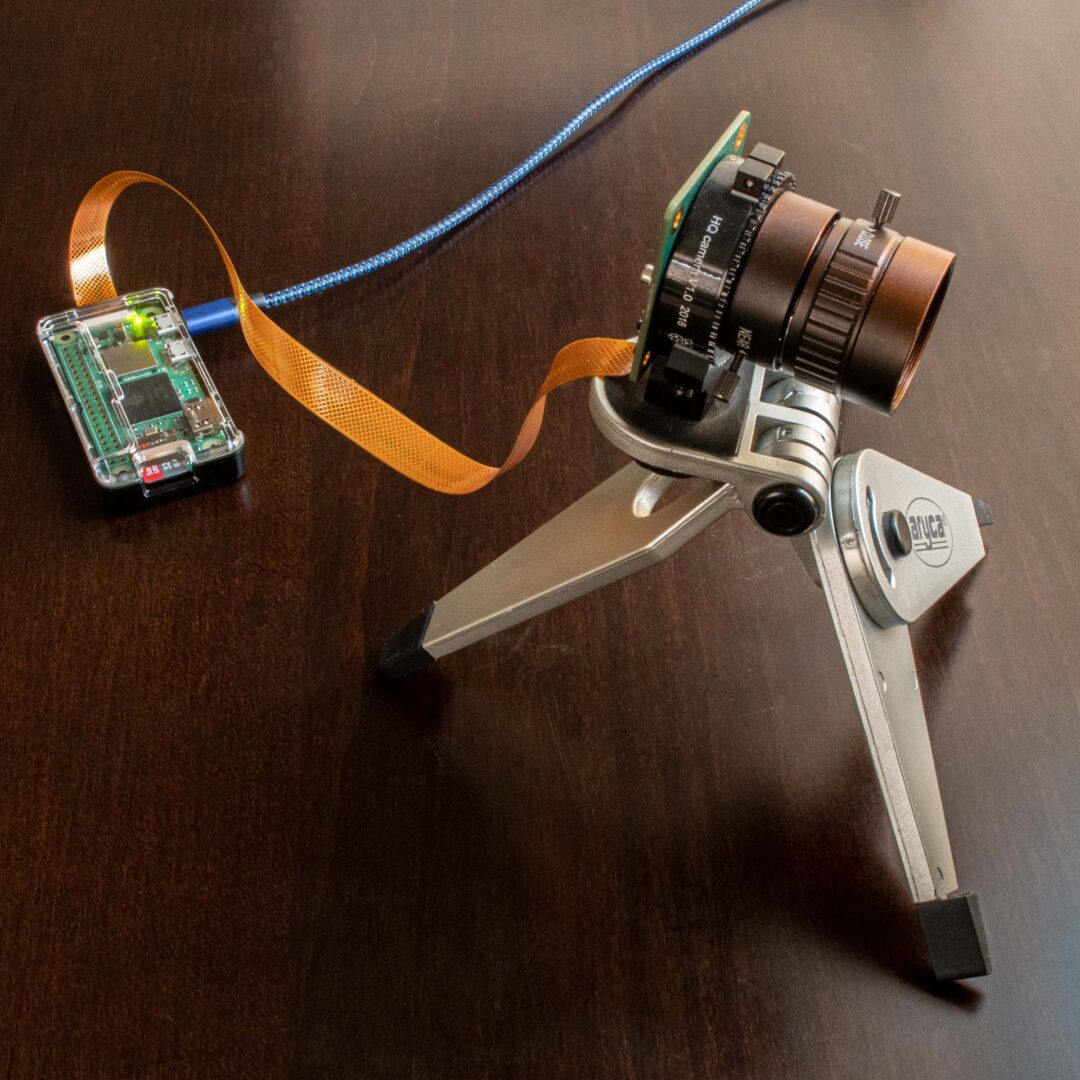
Raspberry Pi Zero 2 W with Raspberry Pi HQ Camera

A couple of weeks ago, I found a Raspberry Pi Zero W 2 in stock at Chicago Electronic Distributors, so I decided to switch my webcam from the Pi Model B to a Pi Zero 2 W. In the last iteration of my webcam, I was using Motion with the Raspberry Pi HQ Camera and the 6mm wide angle lens. With the Pi Zero, you also need the Pi Zero Camera Cable because of the smaller the CSI-2 camera connector.

On my Pi Model B, Motion had been crashing frequently with the errors, “unexpected camera control callback event, 0x4f525245” and “motion_watchdog: Thread 1 – Watchdog timeout Trying to do a graceful restart.” I was never able to sort out the problem after spending more time on it (here and here) than I wanted.

With the new Raspberry Pi Zero W 2, I had initially tried installing the just released Raspberry Pi OS, Bullseye, but I saw that other people were having some problems with Motion and Bullseye, so I installed Buster 10.11 instead.

I used the Raspberry Pi Imager app to setup the micro SD card. One thing that I had forgotten with the imager app was that using Ctrl-Shift-x will bring up an Advanced options dialog box where you can set the hostname, enable SSH, configure WiFi and locale settings. This makes it easier to do a headless setup. After I found the Pi Zero’s IP address on my network (by looking at the client list on my Asus router) I gave it a static IP address then used these great Circuit Basics instructions to setup Motion.

I also installed Apache Web server using the command:

sudo apt install apache2 -y

With the Pi Model B, I had the webcam’s address on a subdomain of my site. I used Dynamic DNS (on Google Domains, my registrar) to redirect to the IP address that my Pi was running on. Because I wanted to enable HTTPS on the camera URL, I got a certificate from Let’s Encrypt, so the URL, pizero.lesliewong.us:8081, was able to use the HTTPS protocol. IIRC, on the Model B, I was able to edit /etc/motion/motion.conf and add the lines:

stream_tls on
webcontrol_tls on
webcontrol_key /path to…/privekey.pem
webcontrol_cert /path to…/fullchain.pem

to enable HTTPS streaming. When I did that on my new setup, it didn’t work because the version of Motion that I installed wasn’t compiled with SSL/TLS support, which I found when I ran the command:

sudo systemctl status motion

After spending a lot of time trying to get that to work and failing using stream_tls, I found a way using the Apache Module mod_proxy:

sudo a2enmod proxy
sudo a2enmod proxy_http

I also added two lines to the file /etc/apache2/sites-enabled/000-default-le-ssl.conf (where /webcam is the URL on the domain, e.g., domain.com/webcam):

ProxyPass /webcam http://xxx.xxx.xxx.xxx:8081/
ProxyPassReverse /webcam http:// xxx.xxx.xxx.xxx:8081/

I was sort of surprised when it worked.

Google Pixel 4a 5G Broken Screen Replacement

In November 2020, when I bought my Google Pixel 4a 5G, I also bought a Spigen Ultra Hybrid Case (#ad) for it. Sometimes I use it. Last Monday, a time that I didn’t use it, the phone fell out of my back pocket onto concrete, landing on its lower left corner and cracking the screen.

Google Pixel 4a 5G

After finding out that I hadn’t purchased device coverage for the phone, I bought a replacement display (#ad) from Amazon for $169.44. From the various choices of Pixel 4a 5G replacement displays on Amazon, I chose the (difficult for me to pronounce) YWLRONG replacement display because it also came with a great set of tools: double side adhesive, an anti-static spudger, precision tweezers, six different screwdrivers, a guitar pick, SIM card ejection tool, suction cup, stainless steel pry tool and B7000 adhesive. I really only had to use the suction cup, stainless steel pry tool and a hairdryer to heat up the adhesive to remove the display. After cleaning the old glue from the case, I used B7000 adhesive to install the new display. It was very straightforward.

Google Pixel 4a 5G phone with broken screen removed

I usually turn to iFixit for great instructions on fixing stuff and there was a nice writeup, Google Pixel 4a 5G Screen Replacement, by: Sam Omiotek (and 2 other contributors). This Google Pixel 4A 5G Screen Replacement YouTube video was the most helpful of the several I viewed.

Windows 11 Insider Preview Build 22458 Install Problem

Windows Update
Windows Update

Update (September 22, 2021): Microsoft released Windows 11 Insider Preview Build 22463 to the Dev Channel and there was a fix: “Fixed an issue that caused some PCs to bug check with DRIVER_PNP_WATCHDOG error when attempting to update to a recent build.” That fix solved this problem, also.

Update (September 20, 2021): I updated to build 22458 with an NTFS formatted external USB 3.0 hard disk attached. But after the successful update, I plugged a M.2 SSD into the same USB 3.0 bus that had a working 4TB USB 3.0 hard disk and got the same errors as I describe below. I switched back to the Beta channel and updated successfully to 22000.194 with the all external drives connected.

TL;DR Windows Insider Build 22458 and the previous two builds (22454 & 22449) won’t install with a connected external USB 3.0 drive that has an APFS partition and NTFS partition.

On September 15, 2021, Microsoft released Windows 11 Insider Preview Build 22458 to the Dev Channel. I had switched back to the Beta Channel (22000.184) because my attempts to install the two previous developer releases (22449 and 22454) failed.

I switched back to the Developer Channel to try the new build and 22458 started installing but after the reboot, I was back at 22000.184. The two external USB 3.0 drives that I had connected during installation caused the problem. Disconnecting the drives then letting Windows Update install 22458 worked. But connecting the external USB 3.0 drives caused the same problems as the two previous builds.

I had Disk Manager open as I connected the two drives and they would show up without drive letters, then the Bluetooth keyboard and mouse would disconnect. The drives would disappear and reappear from Disk Manager and the Bluetooth would reconnect. After disconnecting the external drives 22458 worked as expected. I rolled back to 22000.184

Since I have a 5TB internal disk drive on the system SATA controller, I finally realized that I should try an external USB 3.0 drive formatted only NTFS. This drive worked with 22458 with no problems, so I am concluding that 22458 and the previous two Developer builds don’t like drives with non NTFS partitions (though I have not tried any Linux file systems).

Windows 11 Insider Preview Build 22449 DRIVER_PNP_WATCHDOG error

Update (September 22, 2021): Microsoft released Windows 11 Insider Preview Build 22463 to the Dev Channel and there was a fix: “Fixed an issue that caused some PCs to bug check with DRIVER_PNP_WATCHDOG error when attempting to update to a recent build.

Update (September 9, 2021): Microsoft released Windows 11 Insider Preview Build 22454 to the Dev Channel. My attempts to install 22454 were the same as my experience below with attempting to install Build 22449.

When Windows 11 Insider Preview Build 22449 was released on September 2, 2021, I got a Green screen DRIVER_PNP_WATCHDOG error on many installation attempts.

DRIVER_PNP_WATCHDOG error
Green screen DRIVER_PNP_WATCHDOG

I tried:

  • disabling IDE in BIOS
  • changing IDE/ATA controller driver from Intel(R) 500 Series Chipset Family SATA AHCI Controller to generic Microsoft driver
  • switching to beta channel, installing 22000.176 then back to the dev channel and attempting to install 22449
  • disabling all non-MS services in msconfig

None of those made any difference. I had 2 USB 3.0 external drives connected and when I disconnected those, the installation of 22449 was successful.

I had the same result doing a clean install with the 22000.132 ISO and updating to 22449.

The motherboard is an Asus ROG Strix Z590-I with an Intel Core i7-11700K. The Bluetooth driver is Intel Wireless Bluetooth v22.80.0.4. The IDE ATA/ATAPI controllers are Intel(R) 500 Series Chipset Family SATA AHCI Controller v18.31.1.1033.

For now, I’ve rolled back to 22000.168

La Caridad 78

La Caridad 78
La Caridad 78 Restaurant, 2199 Broadway, New York, NY 10024

I used to live a block from La Caridad, a Cuban Chinese restaurant that was a fixture on the southwest corner of W. 78th Street and Broadway in New York City. I liked it so much that there were times I ate there twice a day. It was among my favorite places to eat during my tenure in New York along with Café Luxembourg, Hoo Lok Restaurant, Capsouto Freres, The Emerald Inn, The Allstate Café and Freddy and Pepe’s (now Freddy and Pepper’s). That was another era.

When I first saw La Caridad, it was a cab driver hangout – there were always cabs doubled parked on W. 78th Street. Over the years, the restaurant expanded nextdoor, then contracted and in July of 2020, La Caridad closed. The pandemic killed it.

The last time I was there, one of the waiters told me that they wouldn’t be in business too many more years anyway, since their lease was going to expire. Covid-19 just hastened it.

Epitaphs:

The New York Times, Eater NY, Curbed, West Side Rag