
High Schoolers, Shanghai, 1975

The blog of a Leslie Wong

Last year I decided to build a new PC. The last time I built a PC was 2005. It was a Shuttle XPC SB51G with a Pentium 4.
I found a case that I liked, the NZXT H1, but it initially had a well documented problem with catching fire when the poorly designed PCIe riser board short circuited to the chassis. I bought a H1 on eBay and NZXT eventually sent me the redesigned riser board. I mounted an EVGA GeForce GTX 1660 Super graphics card on it and I haven’t had any problems with it.

NZXT has since come out with a version 2 of the H1 case that has a larger power supply and an additional coolling fan.
These are the components I used in the build.

The only mod that I made was to the SSD tray. I removed the tabs that held the 7mm drives so the tray could accommodate a 15mm laptop drive. I wanted a large amount of storage but I didn’t want to try to stuff a 3.5″ drive in the case.
Of course, I barely had the PC up and running and Alder Lake, the 12th generation of Intel Core processors, was released.

I use a Nikon D500 for some of my photography. When I first bought storage media, I started out with a Lexar Professional 2933x 64GB XQD card and a Lexar Professional 1000X 32GB SDHC UHS-II card. In late 2020, Nikon released a firmware update to give the D500 CFExpress Type B support.
In early February 2022, Tom’s Hardware had a story about an Adapter (that) Turns SSDs Into Cheap CFExpress Cards. The Sintech CFexpress Type-B adapter uses a NVME M.2 SSD. So I bought an adapter and a Western Digital 256 GB SN520 NVMe SSD.
Assembly only requires removing the label from the SSD, applying some heatsink compound to the cover of the adapter and screwing it together. Before I plugged the SSD into the adapter, I used a little DeoxIT on the contacts.

The adapter and 256 GB NVME M.2 SSD cost me about $90. A quick Google search for a SanDisk Extreme Pro 256 GB CFexpress Card Type B found the best price to be around $279. I also had to buy a Sony MRW-G1 CFexpress Type B / XQD Memory Card Reader for $100, so there’s that.
I was a professional photographer in New York City for 20 years (in the film era). I definitely would not use the Sintech card for an assignment where money was involved. I would use a memory card that’s on the Nikon approved list.
In the future, I will do some testing on the Sintech card and will add the results. For now, the card does work in my Nikon D500:

These are my 2022 Strava bike stats on my Eddy Merckx Professional. It seems I’m going downhill compared to my 2020 Strava stats.

I clipped this Turkey Gumbo recipe out of the NY Times in 1977 and I still make it every time I have turkey carcass.
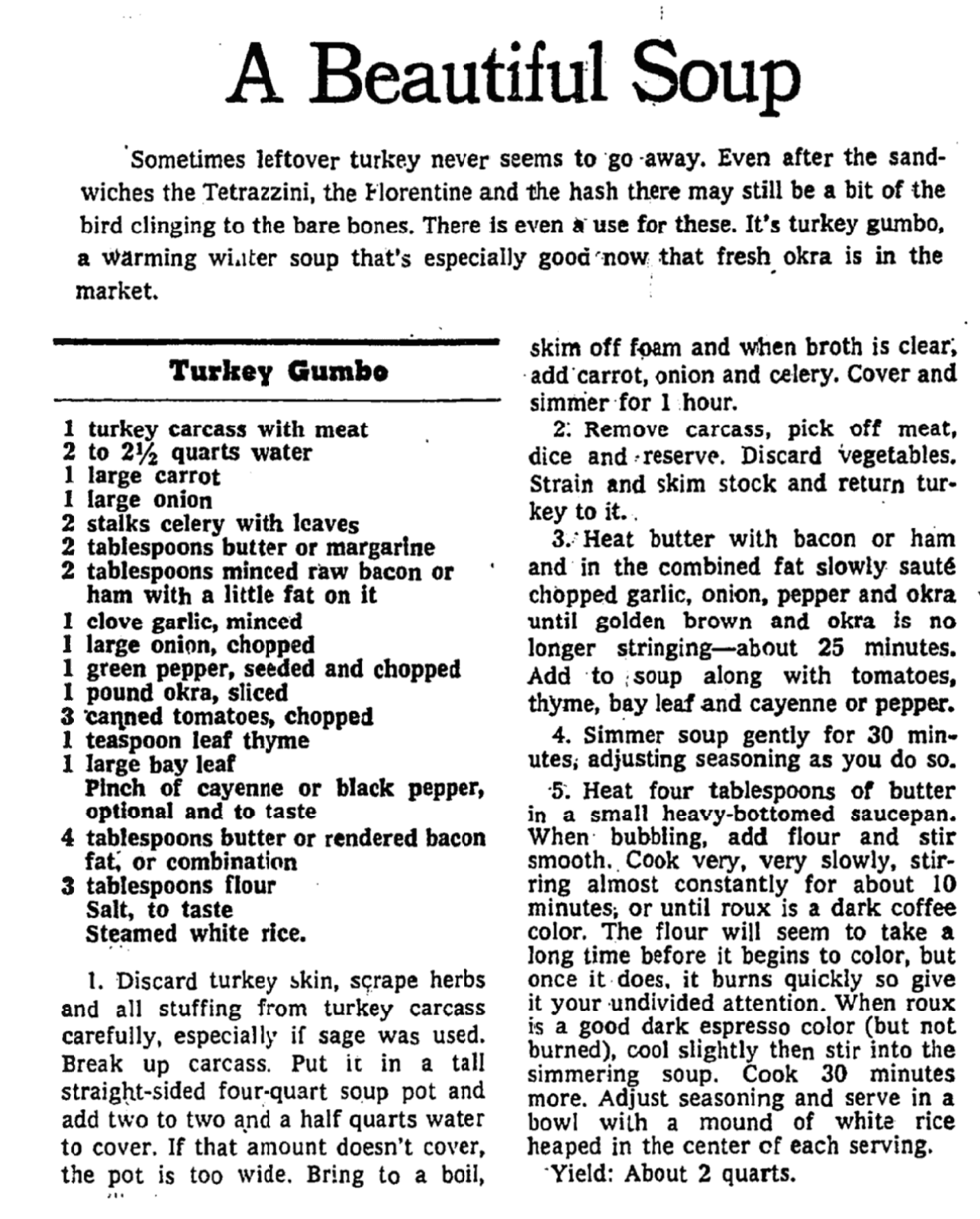
A Beautiful Soup (recipe), NY Times, November 21, 1977, Page 47